Frequently Asked Questions
Find answers to questions you may have when using IFS Cloud.
How can I automatically display the supplier details in a manual supplier invoice?
You can set a Default Cost Code String to the supplier.
- For a practical example, see: Assigning a Default Cost Code String to a Supplier
- For more information, see: Supplier Invoice Configuration.
I can see suppliers and customers from other entities in the lists. Why, and what can I do to show only my own suppliers and customers?
Customers and suppliers on a global level can be seen by all offices. However, offices must work with only the customers/suppliers assigned to them in IFS Cloud, or with intercompany customers/suppliers. You can use filters on the Customers or Suppliers pages to see only data relevant to you.
- For a practical example, see: Using Filters on Customer and Supplier Lists
- For more information, see: Using Record Filters.
How can I configure parts that are frequently sold together to be automatically suggested when creating a sales quotation?
Parts that are frequently sold together can be linked to each other. This way, when you select one of the parts in a customer order or sales quotation, IFS Cloud will automatically suggest the complementary parts.
- For a practical example: Linking Parts Frequently Sold Together
- For more information, see: Creating Complementary Parts.
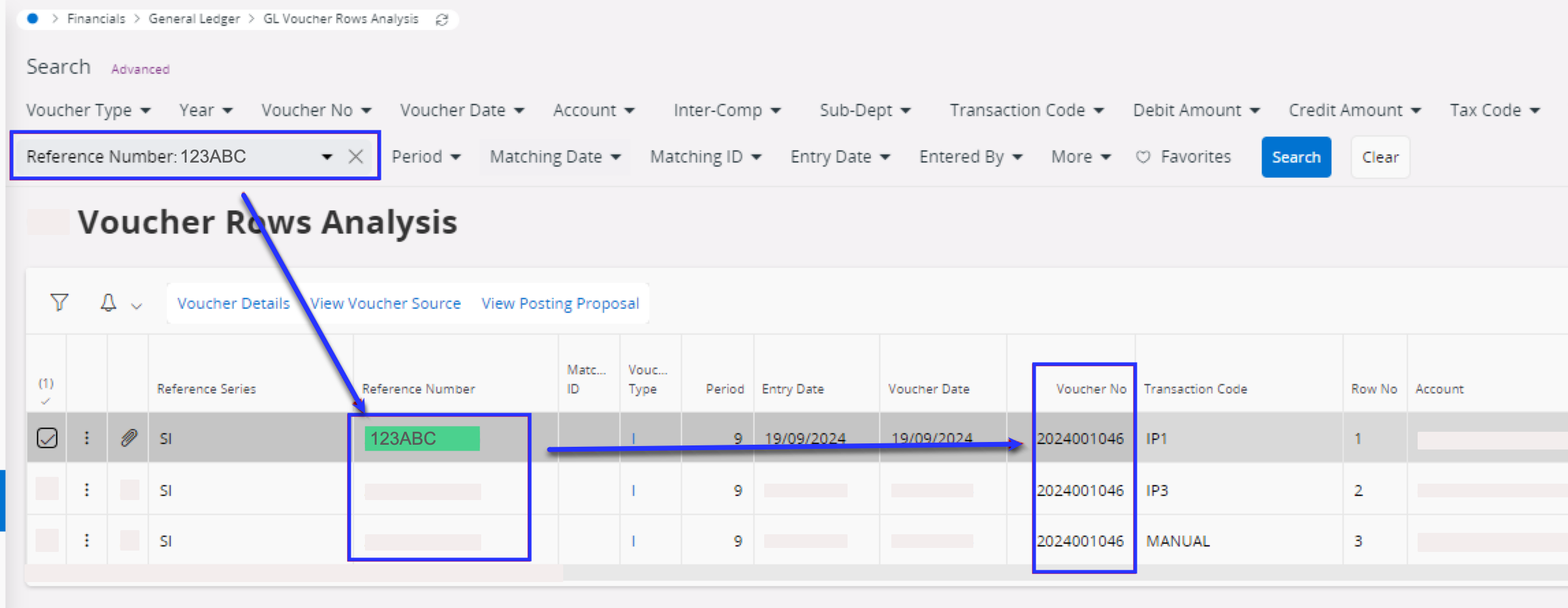
How can I retrieve a voucher number based on my invoice number?
Use the Reference Number field in the GL Voucher Rows
Analysis to retrieve all transactions linked
to a specific invoice.