
Electronic Payment Address Configuration
In the Payment Method area at the bottom
of the page, click the three dots  on a payment method line and click Electronic Payment
Addresses.
on a payment method line and click Electronic Payment
Addresses.
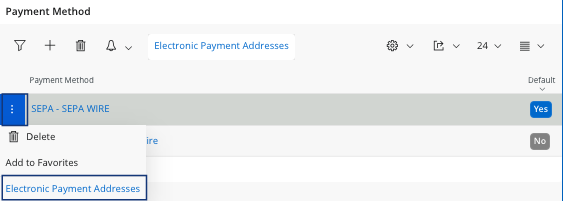
on a payment method line and click Electronic Payment
Addresses.You access a new page with the payment addresses information.
- For a SEPA payment:

Field Description Mandatory Example Payment Method Payment method for this account. Yes SEPA Address ID Address ID associated to the bank account of your supplier. Yes Address 1 Description Account description. Yes Main Account Supplier Account IBAN account for SEPA. Yes FR############### Default Checked if it is the default account. No Yes/No Blocked for Use Checked if it is blocked for use. No Yes/No BIC/Swift Code SWIFT code for the bank account. Yes ############ - For a INTWIRE payment:
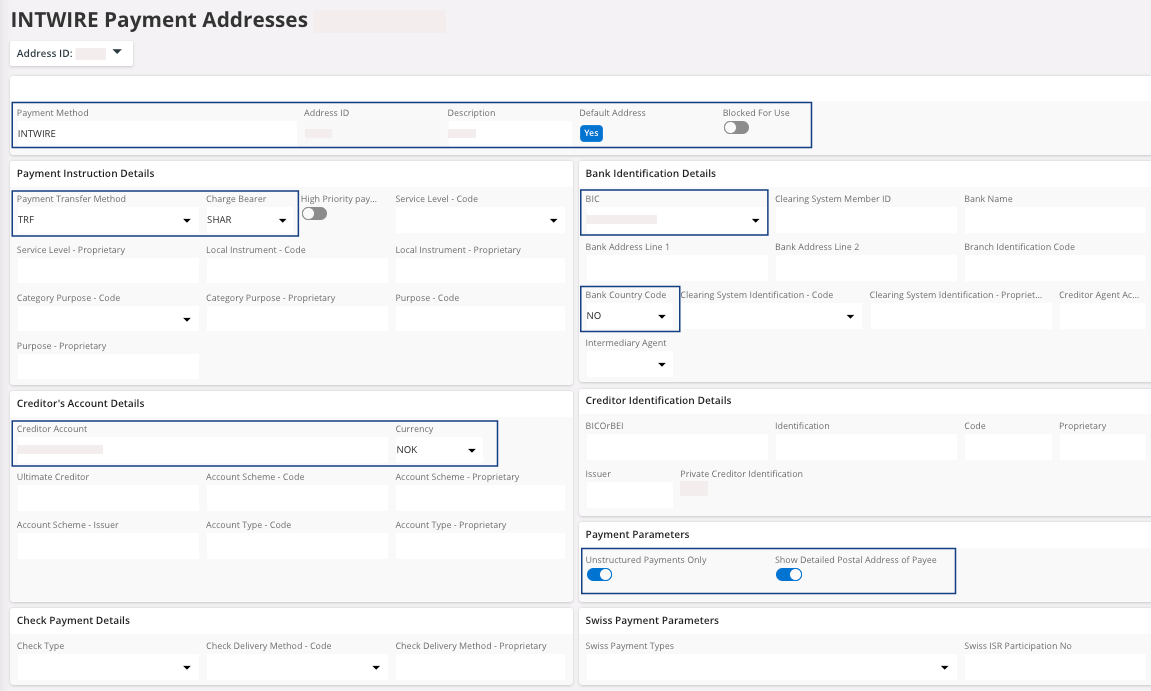
Field Description Mandatory Example Payment Method Payment method for this account. Yes INTWIRE Address ID Address ID associated to the bank account of your supplier. Yes Address 1 Description Account description. Yes Main Account Supplier Default Address Checked if it is the default address. No Yes/No Blocked for Use Checked if it is blocked for use. No Yes/No Payment Transfer Method Always TRF. Yes TRF Charge Bearer Always SHAR. Yes SHAR BIC BIC/SWIFT code for the bank account. Yes ############ Bank Country Code Bank account country code Yes US Creditor Account Supplier bank account number. Yes Currency Bank account currency. Yes USD Unstructured Payments Only Must be selected. Yes Yes Show Detailed Postal Address of Payee Must be selected. Yes Yes