
Customer Credit Information Configuration
You can see and update the customer's credit information from this page.
Click Credit
Information in the menu below
the customer name.
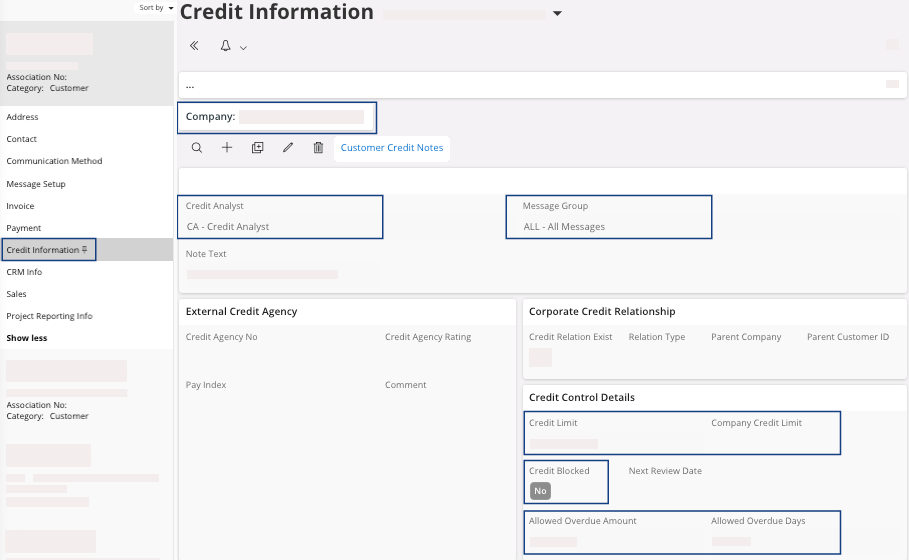
| Field | Description | Mandatory | Example |
|---|---|---|---|
| Company | Airmar/Marport company level. | Yes | MPUK |
| Credit Analyst | Responsible to analyze open credit for customer. | Yes | CA |
| Message Group | Configuration to define the message type sent to the credit analyst. | Yes | ALL |
| Credit Limit | Credit limit in the accounting currency of the company Airmar/Marport. | No | 1000 |
| Company Credit Limit | Standard credit limit for the company Airmar/Marport selected. | Not available here | 1000 |
| Credit Blocked | If this checkbox is selected, then the customer is blocked. | Yes | Yes/No |
| Allowed Overdue Amount | The overdue amount allowed for the customer. This value is expressed in the accounting currency. | No | 1000 |
| Allowed Overdue Days | The number of overdue days allowed for the customer. For example, if you specify 10 days in this field, it will consider the total of unpaid invoices that have exceeded the due date by 10 days as the overdue amount. | No | 10 |