
Customer Invoice Configuration
You can see and update the customer's invoice settings from this page.
Click Invoice in the menu below the
customer name.
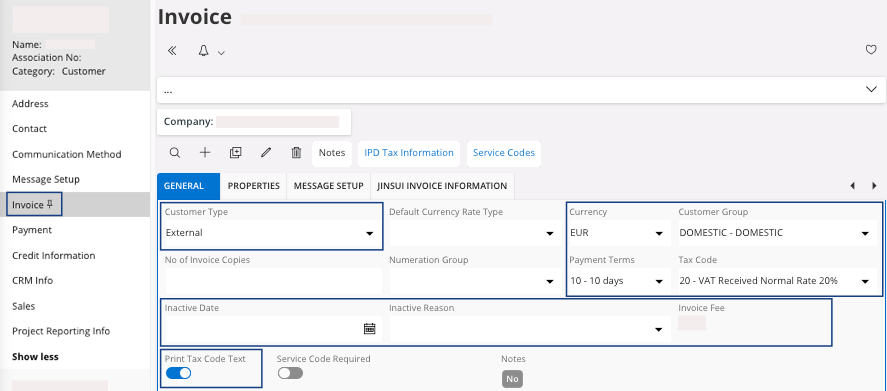
| Field | Description | Mandatory | Example |
|---|---|---|---|
| Customer Type | External or internal, in case this is an Airmar or Marport offices using IFS Cloud. | Yes | External |
| Currency | The currency for customer invoicing. This is the default value that can be modified in a specific order or invoice. | Yes | EUR |
| Customer Group | This field indicates if the customer is an external customer or a specific customer within the group. | Yes | EXT |
| Payment Terms | This is used in order to calculate the due date of invoices. This is the default value that can be modified in a specific invoice. | Yes | 30 |
| Tax Code | This tax code is, by default, only used in manual customer invoices without any connection to orders and sales parts. | No | 20 |
| Inactive Date | End date for use of this customer. | No | 01/01/2021 |
| Inactive Reason | Inactive reason. | No | |
| Print Tax Code Text | Select this checkbox if you want to retrieve specific tax code text in documents. | No | Yes/No |