
Customer Payment Configuration
You can see and update the customer's payment settings from this page.
Click Payment in the menu below the customer name.
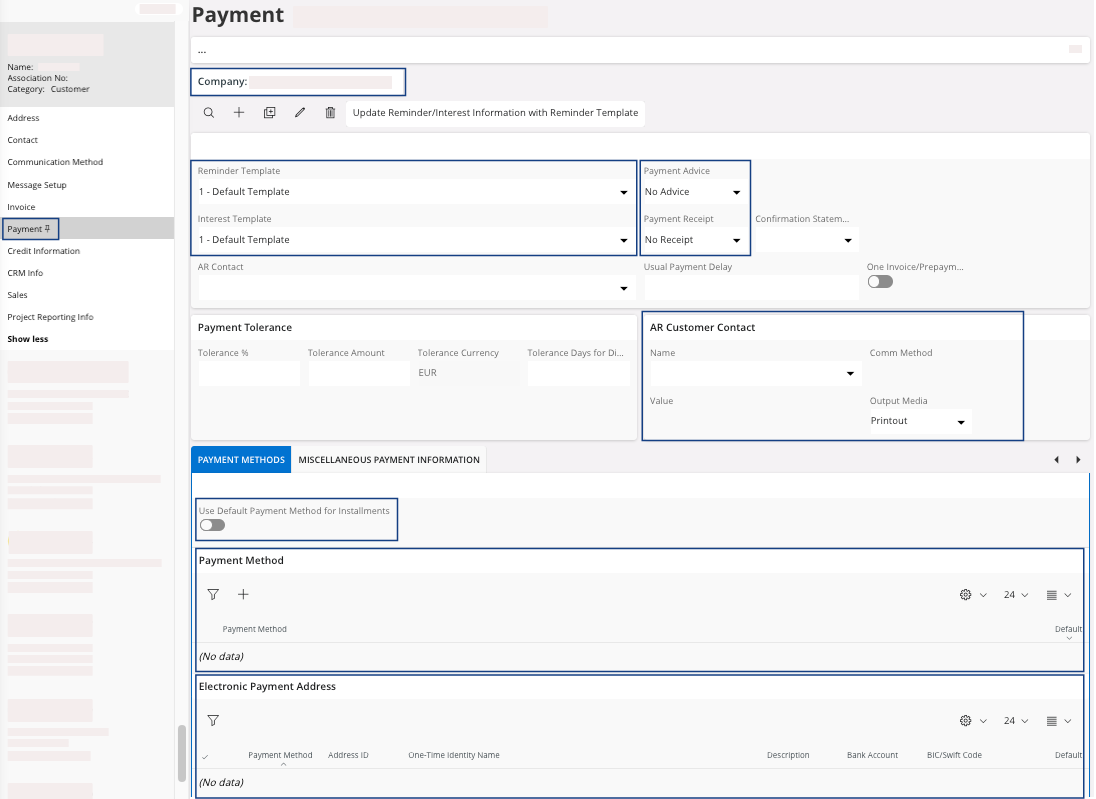
| Field | Description | Mandatory | Example |
|---|---|---|---|
| Company | The identity of the company to which the customer is
linked. Refer to: Naming Conventions. |
Yes | MPUK |
| Reminder Template | Most of the time used with 1 value (0 = no reminder). | Yes | 1 |
| Payment Advice | Should a payment advice be printed when processing automatic customer payment. | No | No advice |
| Interest Template | Most of the time used with 1 value (No interest). | Yes | 1 |
| Payment Receipt | If payment receipt should be printed. | Yes | No receipt |
| AR Customer Contact | Contact used for account receivable communication for this customer. Information comes from Communication Method in Customer. | No | |
| Use Default Payment Method for Installments | Select to copy the customer default payment method to the header and installment lines of all new invoices and items created for the customer. The default payment method will override any payment method linked to the used terms of payment. You cannot select this option for one-time customers. | No | Yes/No |
| Payment Method | The payment method used by the customer when direct debiting is used. This method is used as a selection criterion for loading direct debiting proposals and for creating direct debiting orders. | Yes | WIRE |