
Managing the Bookmarks
Adding bookmarks helps you to be efficient while you navigate through IFS Cloud because you can go directly to your most used pages.
Note:  A bookmark
giving access to the user documentation is by default in the bookmark menu. Do
not remove it.
A bookmark
giving access to the user documentation is by default in the bookmark menu. Do
not remove it.
A bookmark
giving access to the user documentation is by default in the bookmark menu. Do
not remove it.-
Click Expand
Bookmarks
 to expand the bookmark menu.
-
Click Bookmarks
 to display the bookmarks options.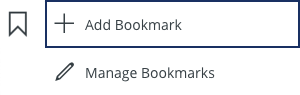
-
When you click Add Bookmark
 to add your page as a saved bookmark, a new pane
appears:
Note:If you set a filter on your page and click Add Bookmark, the filter is saved in the bookmark.
to add your page as a saved bookmark, a new pane
appears:
Note:If you set a filter on your page and click Add Bookmark, the filter is saved in the bookmark.-
Click OK.
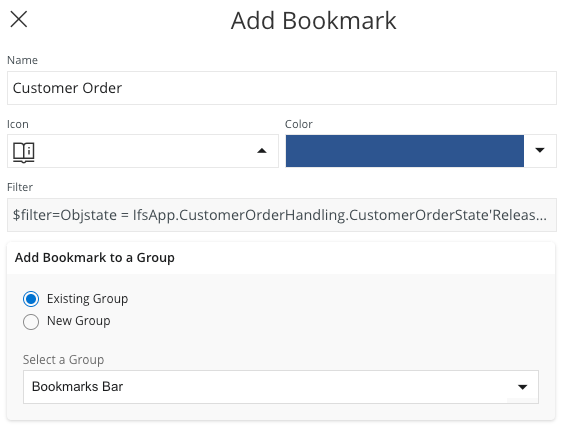
Your page is added in the bookmark menu. You can find it just below the bookmark icons.
-
Click OK.
-
Click Manage
Bookmarks
 to create new groups, edit, reorganize or delete
your existing bookmarks...
to create new groups, edit, reorganize or delete
your existing bookmarks...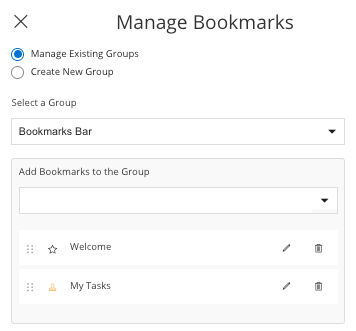
Tip:We advise you to have your own color code to find your bookmarks easily. Add the same color and different icons to the bookmarks created for the same process type.