
Counting Records
Count the quantity of records displayed according to the filter(s) applied.
-
To display the Search Options, click
the magnifying glass
 at the top left corner or use the shortcut
MAJ + /.
at the top left corner or use the shortcut
MAJ + /.
-
Click the three dots
 at the top right corner and click
Count.
at the top right corner and click
Count.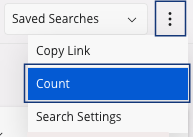
A dialog appears and you can see your total number counted.