
Creating a Credit Invoice
You need to create a credit invoice only if the RMA caused a financial flow.
This process is optional and is to be done only if the return material authorization caused a financial flow. For example if you have to pay back the part or another action that impacts your first invoice. In this case, you need to create a credit invoice.
- Go to the page Return Material Authorization.
-
Select your line(s) and click Approve for
Credit.
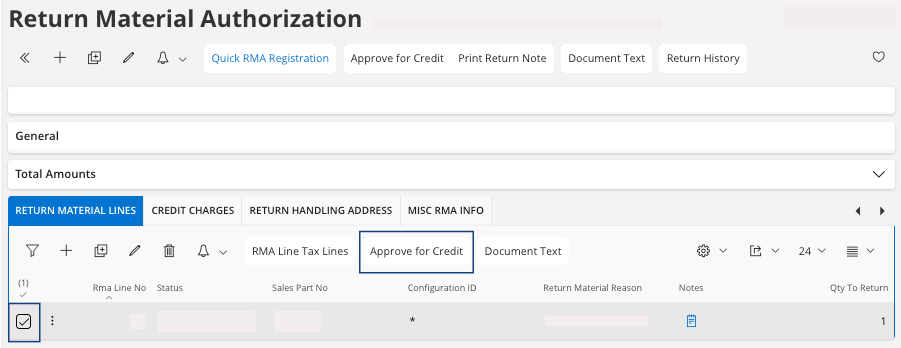
A pane appears, click OK. -
You can create a credit invoice for the full Return Material
Authorization or just for
some lines:
- Select your line(s).
-
Click Create Credit
Invoice.
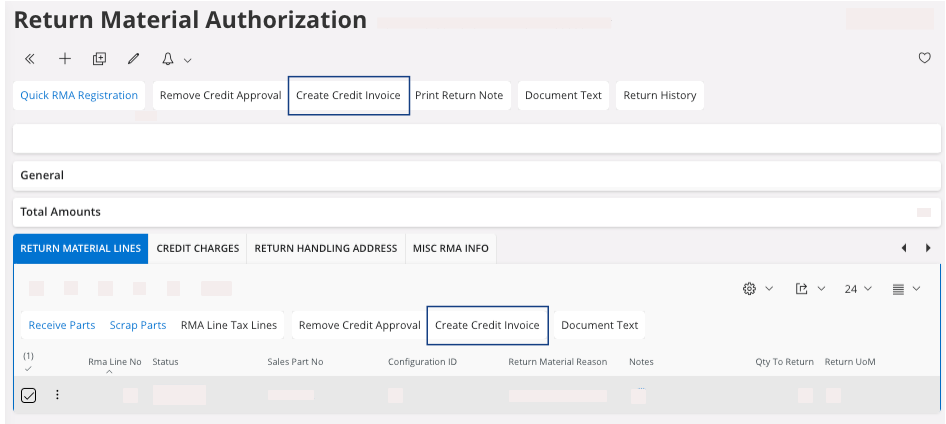
A pane appears. -
On the pane, Create Credit
Invoice:
-
You can decide which RMA lines need
to be credited: in the field Answer, enter
Yes or No according to
the line(s) you want to credit. Once you chose your lines, click
Proceed.
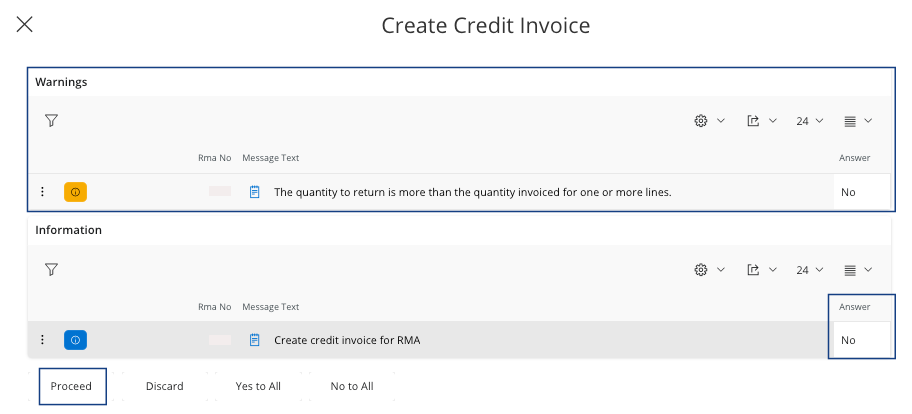
Note:For example, here the warning is important because no invoice was created initially, so it should not be credited.
The pane closes. To see your credit invoice created, click View Credit Corr Invoice. -
You can decide which RMA lines need
to be credited: in the field Answer, enter
Yes or No according to
the line(s) you want to credit. Once you chose your lines, click
Proceed.