
Reserving a Package
If you have parts with the supply code: Pkg, you need to reserve it through a specific process.
Note:
To display what define your parts,
click  > Column Chooser and add
the column Supply Code. In this
column, you can see if your part is a shop order or an invent
order or has another supply code.
> Column Chooser and add
the column Supply Code. In this
column, you can see if your part is a shop order or an invent
order or has another supply code.
> Column Chooser and add
the column Supply Code. In this
column, you can see if your part is a shop order or an invent
order or has another supply code.-
On the page Customer Order: on
your line, click the three dots
 , click .
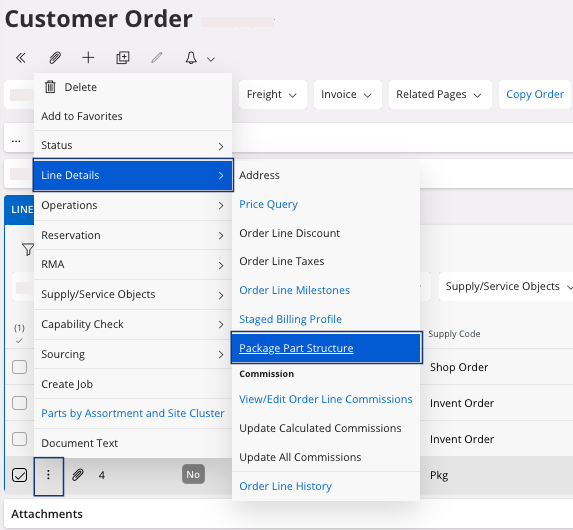
The Package Part Structure page appears. -
Select the parts that you want in your package part, click .
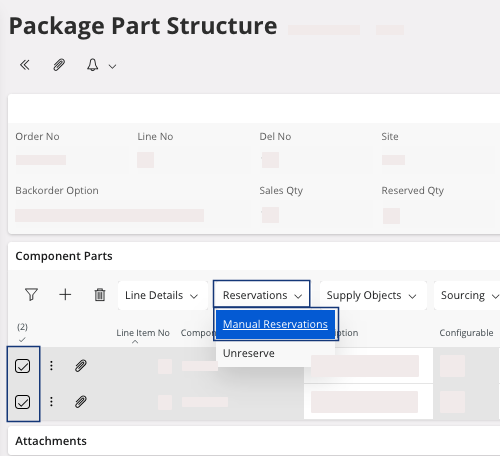
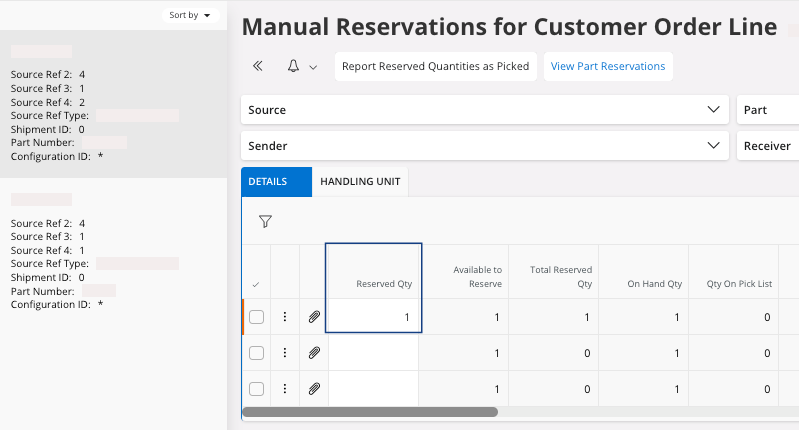
A new page appears, Manual Reservations for Customer Order Line with the parts you can reserve from your stock. -
Fill the field Reserved Qty with
the quantity needed, for all your parts.
A dialog appears, click Yes to confirm you want to reserve the part.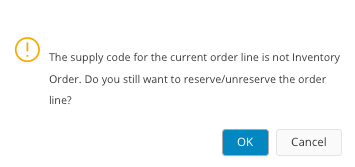
If you finished your reservations, you need to deliver your customer order: perform Delivering a Customer Order for a delivery without specificity or Delivering a Customer Order with Shipment Details if you want to deliver with specific shipment details like handling units.
Remember:
Click the Airmar button at the
top of the page to access the next process pages
directly.