
Reserving an Invent Order
If you have parts with the supply code: Invent Order, you need to reserve it through a specific process.
Note:
To display what define your parts,
click  > Column Chooser and add
the column Supply Code. In this
column, you can see if your part is a shop order or an invent
order or has another supply code.
> Column Chooser and add
the column Supply Code. In this
column, you can see if your part is a shop order or an invent
order or has another supply code.
> Column Chooser and add
the column Supply Code. In this
column, you can see if your part is a shop order or an invent
order or has another supply code.-
On the page Customer Order:
select your lines with the supply code invent order, click .
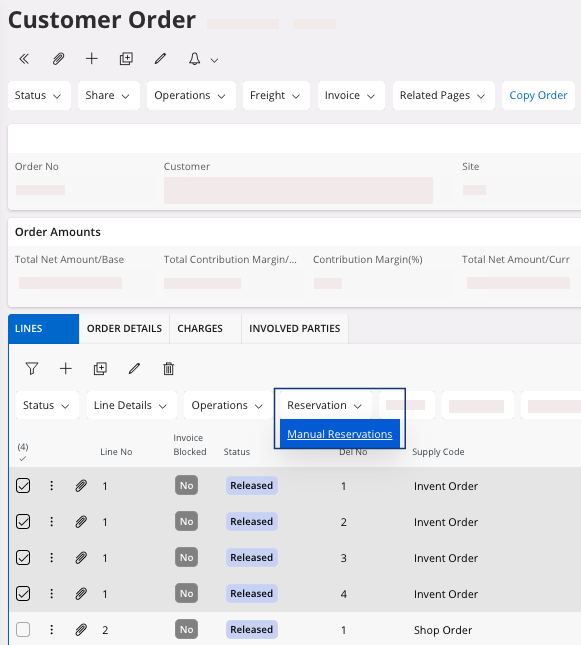
A new page appears, Manual Reservations for Customer Order Line.Attention:If you do not have any record on this page, it means that you do not have any part in stock. You cannot reserve it.If you have to adjust your stock, see Adding a New Quantity for an Inventory Part.
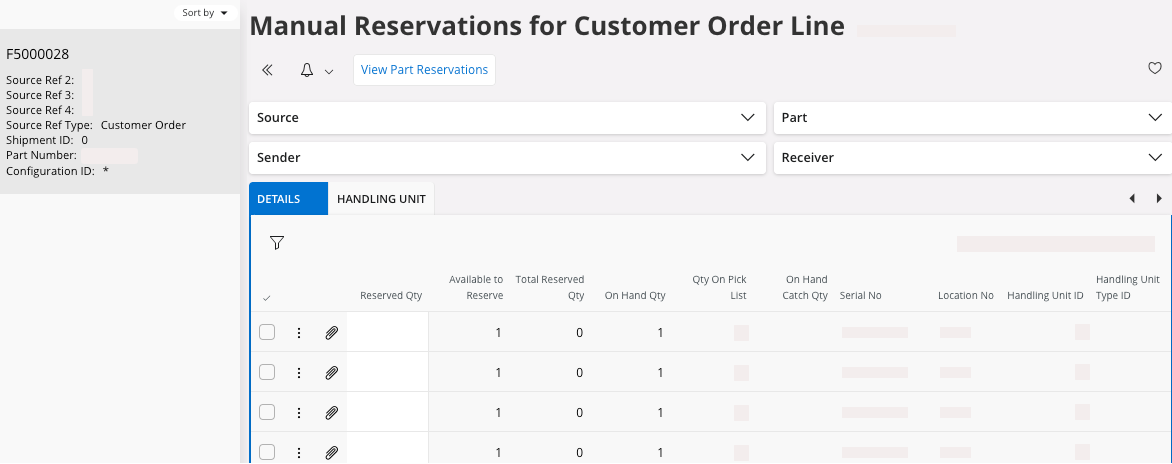
Note:You have as many manual reservations as lines selected. -
Select the line and fill the field Reserved Qty with the quantity
corresponding to your customer order.
Pay attention to:
- The Location and Warehouse to reserve the quantity where you take the stock.
- In case of a serialized part, the Serial No has to be the one you reserve/pick in the stock.
- It saves automatically.
If you finished your reservations, you need to deliver your customer order: perform Delivering a Customer Order for a delivery without specificity or Delivering a Customer Order with Shipment Details if you want to deliver with specific shipment details like handling units.
Remember:
Click the Airmar button at the
top of the page to access the next process pages
directly.