
Posting the VAT Declaration
You need to post the VAT declaration monthly.
- Go to .
-
Fill the fields:
- Company.
- From Year - Period and To Year - Period.
- From Account and To Account: all the VAT accounts.
- In the field Tax Clearance Base, you must select Reported Tax.
- Voucher Date for the transactions that will be created.
- Voucher Type.
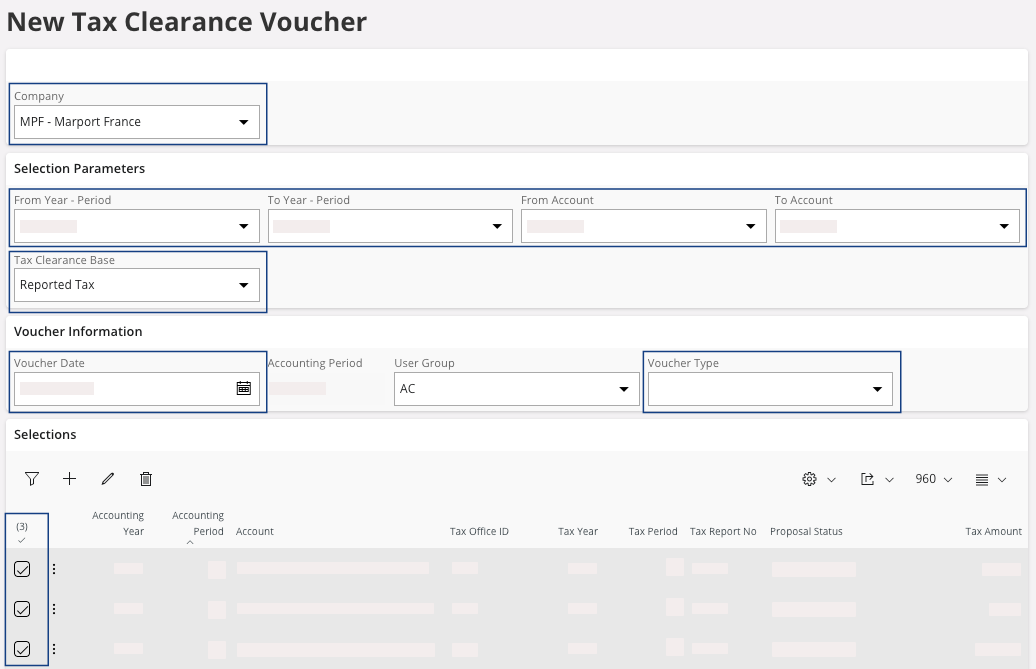
Once you have filled your fields, your lines appears in the area Selections. -
Select all your lines and click OK.
You move to the page Tax Clearance Analysis.
-
You have a tax clearance analysis that contains the general ledger entries: on
your line click the three dots
 and click
View Vouchers.
The Voucher Details Analysis page appears.
and click
View Vouchers.
The Voucher Details Analysis page appears.