
Consulting a Supplier Analysis
- Go to .
-
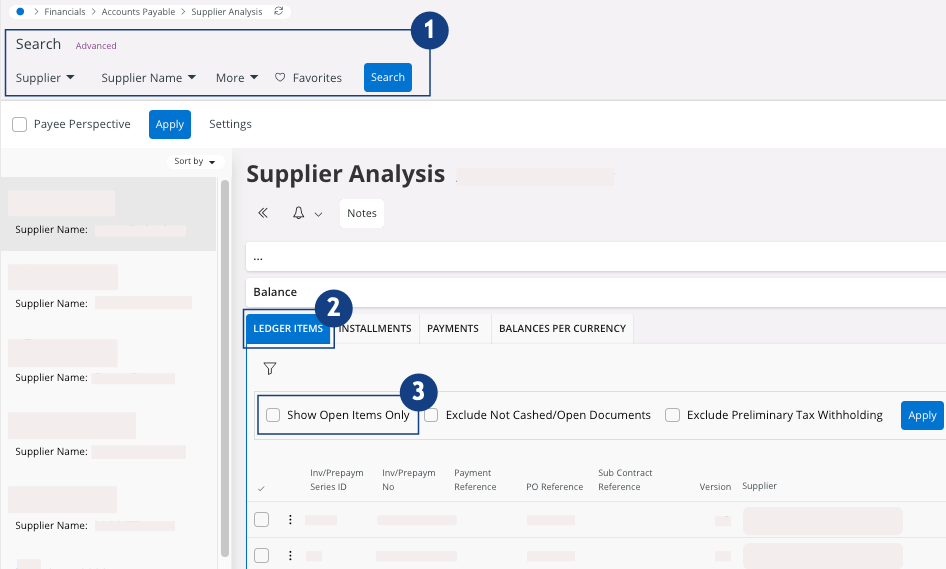
Use the search bar to filter your supplier
 .
.
-
In the tab Ledger Items
 , you can see the transactions made by your
supplier:
, you can see the transactions made by your
supplier:
-
Select the checkbox Show Open Items
Only to see open
transactions
 .
.
- Do not select any checkbox if you want to see all the transactions.
Remember:You can export this report in an Excel file. On your lines area, click > Export All Rows and
choose if you want to see data from the columns displayed only
or from all the columns.
> Export All Rows and
choose if you want to see data from the columns displayed only
or from all the columns.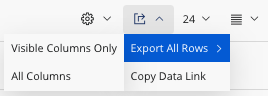
-
Select the checkbox Show Open Items
Only to see open
transactions
-
To get an overview of balances for all the suppliers, go to the page Payables
Analysis. Then to get the
details for each supplier, click the three dots
 and click
Supplier
Analysis.
and click
Supplier
Analysis.