
Doing a Partial Delivery
Deliver only some sales parts of a customer order.
- Go to .
-
Find your Customer Order, click
the three dots
 and click Deliver with
Differences.
and click Deliver with
Differences.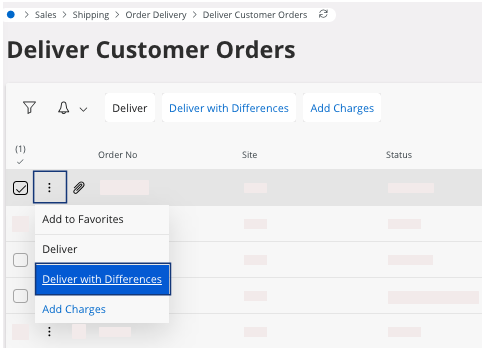
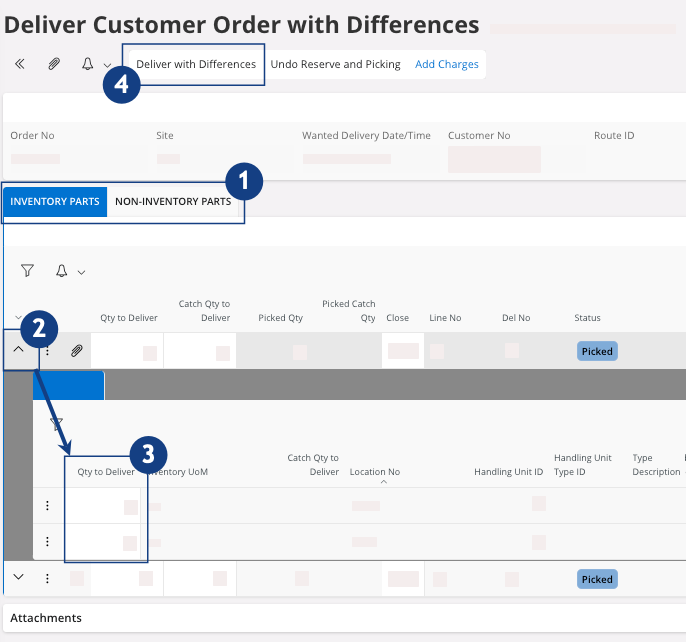
A new page opens, Delivery Customer Order with Differences. -
Adjust the quantity of the line(s) that you do not want to deliver:
-
According to the part you want to exclude, choose if you want to
perform this action in the tab
 :
:
- Inventory Parts, parts in the stock for which the company keeps track.
- Non-Inventory Parts, parts related to services (labor, freight, etc.), or used within the company, or that are not tracked in stock.
-
Click

 .
.
-
Change Qty to Deliver to
0 or less than the delivery quantity scheduled
 .
.
-
Confirm your changes: click Deliver with
Differences
 .
.
-
According to the part you want to exclude, choose if you want to
perform this action in the tab
- The status of the lines not delivered changes back to Released. If you want to deliver them, you need to reserve and pick them. See Reserving an Order.
- The other(s) line(s) have the status Delivered or Partially Delivered.
Note:
If you made a mistake or want to change data
after the delivery in IFS Cloud
but before the physical delivery, see Undoing a Customer Order Delivery.
Remember:
Click the Airmar button at the
top of the page to access the next process pages
directly.